
 Post by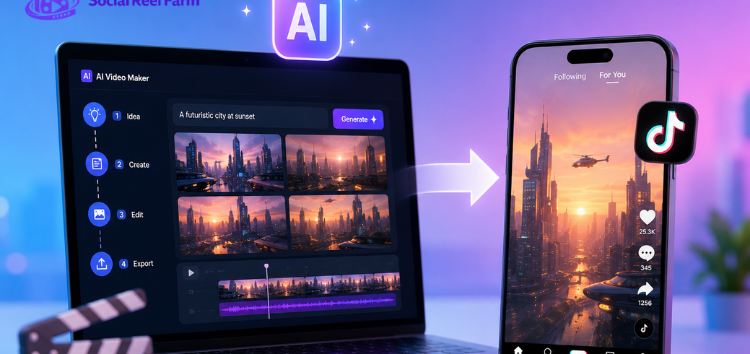
An AI TikTok video maker turns a rough idea into a ready-to-post clip fast. You skip the traditional editing timeline completely. Instead of cutting clips and syncing music by hand, an AI TikTok video maker does the work for you. It generates scenes, writes captions, and suggests trending sounds from a simple prompt. This matters because most creators don’t have hours to edit every video. Yet TikTok rewards frequent, consistent posting above almost everything else. In this guide, we’ll cover how these tools work. We’ll walk through the steps to use one, from picking a template to exporting your final clip, so you can start posting today. We’ll also show where to look if you need help getting your videos seen. Real audiences matter more than a handful of viewers.
What Is an AI TikTok Video Maker?
An AI TikTok video maker uses artificial intelligence to automate parts of the video creation process. Instead of arranging clips by hand, you type a script or topic. The AI then selects footage, adds voiceovers, and generates on-screen text automatically. Some tools even build AI avatars that speak your script to the camera. This suits creators who don’t want to appear on screen themselves.
The appeal is speed. Manual editing used to take an hour; the AI version often takes minutes. For solo creators posting daily, an AI TikTok video maker removes a major bottleneck. It lets teams focus on ideas instead of technical editing work. Many tools also offer multiple aspect ratios and export presets. You can reshape one video for TikTok, Instagram Reels, or YouTube Shorts without starting over. This flexibility saves real time, since repurposing one idea often beats building three videos from scratch. It also keeps your messaging consistent across every platform your audience actually uses.
How to Use an AI TikTok Video Maker: Step by Step
Getting started with a tiktok video maker ai tool follows a similar process on most platforms. Here’s a simple breakdown:
- Choose a template or start from a prompt – Pick a trending template. Or type a topic and let the AI draft a script.
- Edit the script and pacing – Review the AI-generated script, adjust the tone, and trim anything off-brand.
- Pick visuals and voice – Select stock footage, AI avatars, or your own clips. Then pick a voice style for narration.
- Add captions and music – Most tools auto-generate captions and suggest trending audio to boost reach.
- Export and review – Preview the video, check timing and text overlays, then export in TikTok’s vertical format.
Following this process helps you post more often without losing quality. It also gives you a repeatable workflow you can hand off to a teammate. Once the steps become routine, a single video can go from prompt to publish in under fifteen minutes.
AI Video Maker vs a Traditional Editor
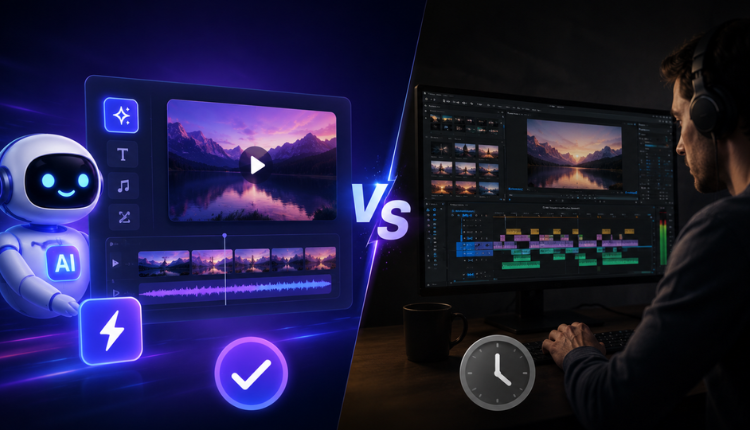
Creators often ask if AI can fully replace a traditional tiktok video editor. Both tools have a place, honestly. A standard editor gives you full manual control over every frame and effect. That control matters for polished, brand-specific content. Every detail needs to match a style guide exactly, and only manual editing gives you that level of precision.
An AI TikTok video maker prioritizes speed and volume instead. It suits creators who need many videos fast. It also works well for testing hooks or repurposing long-form content into short clips. Many creators use both tools together. They use AI for first drafts and quick turnarounds. Then they use manual editors to polish their best-performing videos before scaling them up. Neither approach wins outright. The right choice depends on your available time and how polished the final result needs to be. Most teams settle into a mix once they know which videos are worth the extra polish.
Exploring Free Options to Get Started
You don’t need premium software to start. Many platforms offer a free ai video maker for tiktok plan with basic templates and limited or watermarked exports. That’s enough to test whether the workflow fits your content style before you spend any budget. Most beginners can post several videos a week using only the free tier.
Free plans let you experiment with prompts, voice styles, and caption formats first. Once you find a workflow you like, upgrading usually unlocks longer clips, more voice options, and watermark-free exports. This upgrade pays off once you post regularly and need cleaner output for a growing audience. Also check export limits on free tiers. Some cap monthly videos or restrict certain voice and avatar styles until you upgrade. It’s worth comparing two or three tools before you settle on one long term, since pricing and voice quality can vary quite a bit between providers.
Also Read
Done-for-You TikTok Posting: 2026 Agency Guide
Multi-Account TikTok Management for Ecommerce (2026)
Getting Your Videos Seen: Why Distribution Matters Too
Creating a polished video solves only half the challenge. Even a great AI TikTok video maker’s output can sit at a few hundred views on one account. A distribution partner like Social Reel Farm helps here.
Social Reel Farm doesn’t replace your video creation process. Instead, it focuses on what happens after you make the video:
- A network of 1,000+ real accounts across TikTok and Instagram, each on its own physical device
- Trained operators who post and manage accounts by hand, with no bots or fake engagement
- A test-validate-scale process that finds which hooks and formats actually perform, then scales volume behind them
- One system that handles both TikTok and Instagram distribution together
If you already have a solid AI-made video but limited reach on one account, structured distribution can fill that gap.
Tips for Better Results
A few small habits noticeably improve your output quality. Keep prompts specific instead of vague; detailed instructions produce more relevant scripts and visuals than a generic one-liner. Always review AI-generated captions for accuracy before posting. Automated transcription often misreads names, slang, or niche industry terms. Testing multiple hooks for one video idea also helps. You’ll spot what resonates before you build a longer series around one format.
Keep a simple log of which prompts and templates performed best. This way, you’re not starting from zero with every new video. Over a few weeks, that log becomes a reusable playbook. It’s a shortlist of hooks, pacing styles, and caption formats that reliably hold attention. This makes future videos faster to plan. Even a basic spreadsheet with a few columns for hook type, length, and result can reveal patterns worth repeating. Small tweaks based on that data often matter more than switching tools entirely. Over time, this habit alone can improve your average views more than any single feature upgrade.
Conclusion
An AI TikTok video maker makes short-form content faster to create, even without any editing background. Follow a clear process, pick the right tool for your needs, and test both free and paid options. You’ll consistently produce professional-looking videos without spending hours on each clip. Once your content is ready, pair it with the right distribution approach. That’s what turns a good AI TikTok video maker workflow into real, measurable growth, not just a folder of well-made clips nobody sees.
FAQs
Do I need editing skills to use an AI TikTok video maker?
No. Most tools target beginners and need only a script or prompt to start.
Is a free plan good enough to start?
Yes. Free plans usually work well for testing your workflow before you upgrade for watermark-free exports.
Can AI-made videos still feel authentic?
Yes, especially when you personalize scripts, voice tone, and visuals instead of using default templates.
What if my videos aren’t getting views?
Reach often depends on distribution, not just content quality. Testing across more accounts can help.